An AI team that asks before it acts, and shows you what it achieved
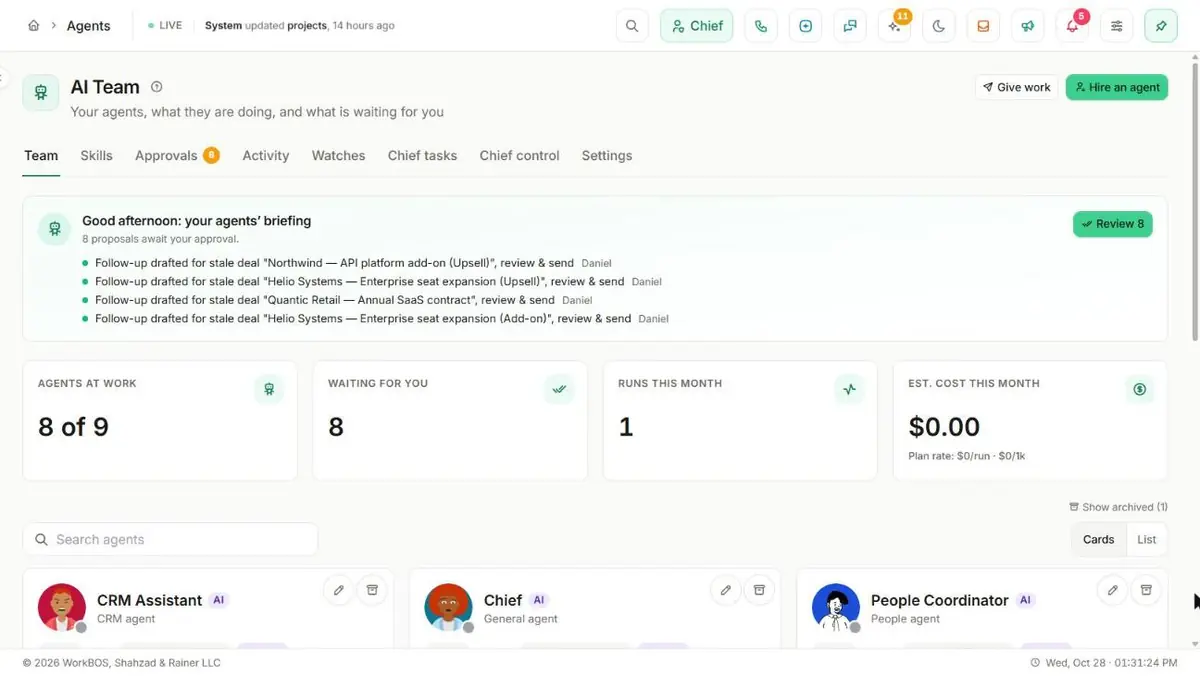
Hire ready-made AI agents for accounting, CRM, support, HR and marketing, give them expert skills, and let them watch for the things you would otherwise keep checking. Every proposal waits for a person by default.
Free for up to 5 users. Pro free for 30 days. No card.
Why this exists
- AI tools either do nothing useful or do things nobody approved.
- Somebody has to keep checking for the overdue invoice and the deal that went quiet.
- Nobody can say what an AI tool actually achieved, or what it cost.
What it does
What it does
01Hire a ready-made agent or a whole team
More than twenty ready-made agents across accounting, CRM, support, HR, people, work, marketing and the office, and 120 specialists for 23 kinds of business. Hire one and adjust it, or hire a whole team at once.
02Give it expert skills
Expert skills is a library of more than 400, such as a CFO, a contract reviewer or an SEO specialist. Each agent takes up to 12, and the assistant picks the one or two that fit each question and says which it used.
03Approve first, always by default
An agent proposes a typed action and a person approves it on Agent Approvals. It can only do what the approving person could do, and every proposal is dry-run against your live data first.
04Watch so you do not have to
Tell Chief "tell me if any invoice goes overdue" and a watch checks every 15 minutes or daily. A standing condition opens one item, not a stream of alerts, and the right agent is picked to handle it.
05Hand Chief background work and routines
Chief tasks runs a job in the background under your own permissions, and a routine runs one on a schedule, such as a weekday brief at nine.
06Decide what Chief may do
Chief control holds the workspace switches (change records, drive the screen, voice, background tasks, outside apps, files), an activity log of every step, and an autonomy dial of Off, Suggest or Auto for each kind of action.
07See what each agent achieved
Activity and ROI gives every agent a score out of 100 and a grade for the last 30 days, built from approvals, work that stuck, reliability, time saved and value for money, beside what it cost.
08Set up a workspace from your industry
Business Architect offers ready-made setups for twelve kinds of business, from a marketing agency to a nonprofit, and files each step into Agent Approvals rather than applying anything by itself.
The honest part
What it does not do
The part you would otherwise find out in week three. If one of these is central to how you work, raise it before you buy rather than after.
Questions
Questions, answered
Can an agent do something nobody approved?
Not by default. Agents are approve-first and most workspaces leave them that way. An owner can set some low-risk, reversible kinds of action to Auto on the autonomy dial, and everything else still waits for a person.
Can an agent see more than I can?
No. An agent only does what the approving person could do, through the same permissions and workspace walls a person is held to, and a background task runs as you.
How do I know an agent is worth keeping?
Each one has a score out of 100 and a grade over the last 30 days, shown with what it cost, and the agent page says what is pulling the score down.
The full product documentation for this module is at /docs/agents.
Read next
Pro and up
Automations
Every plan
Integrations
Every plan
Team chat and calling
Try it on your own data
Every module is in the same workspace, so nothing needs connecting to anything.
Free for up to 5 users. Pro free for 30 days. No card.