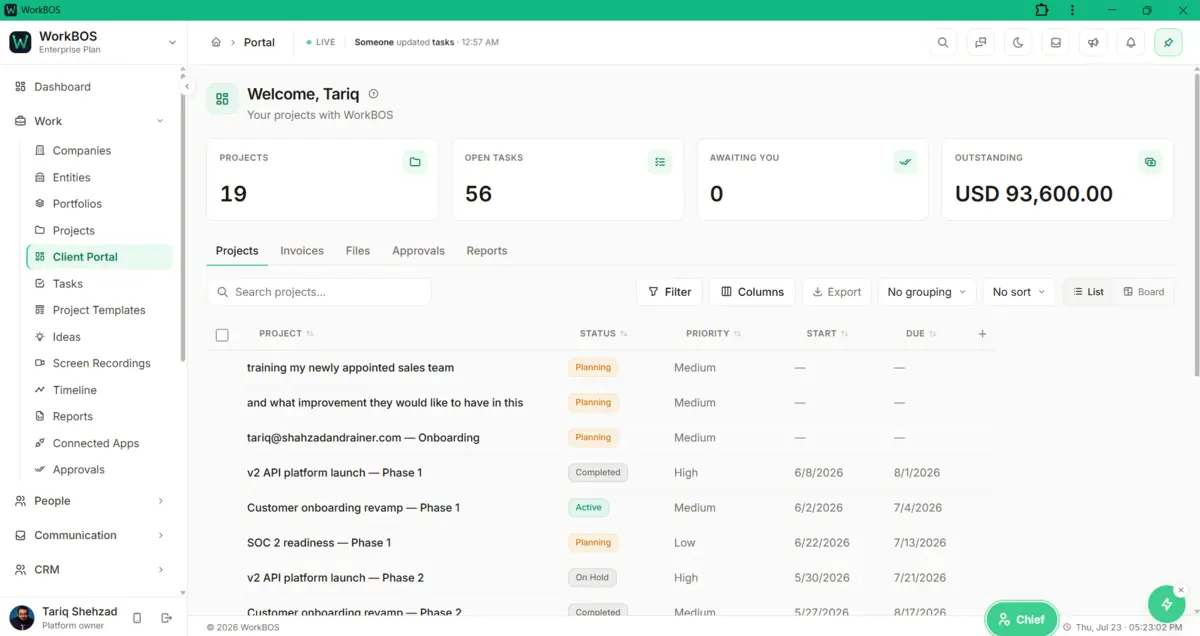
A client login that shows exactly what you chose, and nothing else
Guests you invite land on a branded home at /portal, seeing only the projects, invoices, files and reports you gave them access to. It is enforced on the server, not just hidden in the interface, and a guest never counts against your seat limit.
Free for up to 5 users. Pro free for 30 days. No card.
Why this exists
- A client emails to ask for a status update you already have on screen in front of you.
- Sharing a project folder usually means sharing more than the client was ever meant to see.
- Chasing a sign-off means a separate email thread nobody can find again in a month.
What it does
What it does
01Brand it as your own
The portal inherits your workspace logo and colours from Settings > Branding automatically, and a reseller’s custom domain shows their own brand instead of ours.
02Show exactly the projects you choose
Invite a guest under People > Portal Access, pick their access level and which projects they can see, and they land straight on /portal after signing in. Change what they see at any time and it applies immediately.
03Share invoices without another email
Each project’s invoices list their status, dates, total and balance due, so a client can check what they owe without asking you first.
04Share files, read-only
Set a drive’s "Client portal" project under Drives and its files appear in that project’s portal for the client to open and download; leave it "Not shared" to keep a drive internal.
05Send something for sign-off
Work > Approvals holds two queues on one screen: requests raised inside your workspace, and client sign-offs. Raise a sign-off with a title, the detail, a deadline, a priority and an optional amount, and it appears on the client’s portal under Approvals; they approve or reject it with an optional note, and the decision shows back on your side.
06Put the reports you choose in front of them
Reports are hidden from guests by default. Click Share to portal on any report and it appears on that client’s own Reports tab, without exposing anything else in the workspace.
The honest part
What it does not do
The part you would otherwise find out in week three. If one of these is central to how you work, raise it before you buy rather than after.
Questions
Questions, answered
Does the portal use my own branding?
Yes, automatically. It reads your logo, name and colour from Settings > Branding, and a reseller’s own custom domain shows their brand instead of ours.
Can one client see another client’s projects?
No. A guest is scoped to only the projects you invited them to, and that is enforced on the server rather than just hidden by the screen.
Can a client pay their invoice from inside the portal?
Not directly: the Invoices tab shows status and balance due, but paying happens on the separate hosted invoice link, which carries its own Pay now button once you have connected Stripe.
Does inviting a client use up one of my seats?
No. Guests are unlimited and never count against your seat limit, whatever plan you are on.
The full product documentation for this module is at /docs/client-portal.
SourcesGuests only see what is shared with them because the database enforces it. PostgreSQL row security policies (opens postgresql.org in a new tab).
Read next
Every plan
Invoicing and payments
Every plan
Drive and files
Pro and up
Reports
Try it on your own data
Every module is in the same workspace, so nothing needs connecting to anything.
Free for up to 5 users. Pro free for 30 days. No card.