A phone system that already knows who is calling
Buy a number, answer it in the browser, and the call attaches itself to the client, contact or lead it belongs to. The history is one timeline instead of a phone app beside a CRM.
Free for up to 5 users. Pro free for 30 days. No card.
See it work
Your business line, routed your way
A main number, opening hours, a menu, the right teammate rung, voicemail, and AI notes on every call.
The real product, filmed in a made-up demo workspace. No sound; captions on.
Why this exists
- The phone system and the customer record are two different products that never met.
- Nobody knows who called, or what was agreed.
- Adding a number means a separate vendor, a separate bill and a separate login.
What it does
What it does
01Buy a number where you need one
Search available local and toll-free numbers by area code, city or digit pattern and buy in one click. Numbers are available in 38 countries. Bring your own existing number instead if you prefer.
02Answer in the browser
Take and make telephone calls from a dialer that stays docked or floating while you work, with transfer, call notes and click-to-call from any CRM record.
03Route the call properly
Call flows and ring groups decide where a call lands, with extensions per teammate, do-not-disturb, and up to five follow-me destinations.
04Never lose the voicemail
Every workspace gets a main voicemail box, and you can add personal or team boxes, each with its own greeting and up to five email addresses that get a copy.
05Turn a call into a lead
Press Make lead on a call, text or voicemail, or let owners and admins switch on Automatic leads. A call counts only for the time after a person answered, robocalls, toll-free numbers and spam-labelled callers never create a new lead (a number that already has one still links to it), and the carrier’s caller name is used when there is one. The voicemail list has a Lead column showing which lead each message belongs to.
06Text from the same number
Send and receive texts with delivery receipts, in a two-way conversation view per contact, with unread replies badged on the menu.
07See what it costs, itemised
A billing tab shows the month so far broken down: number rental, inbound and outbound minutes, texts sent and received, and transcription, each with quantity, rate and amount. Past months stay readable.
08Draw the call flow, not a form
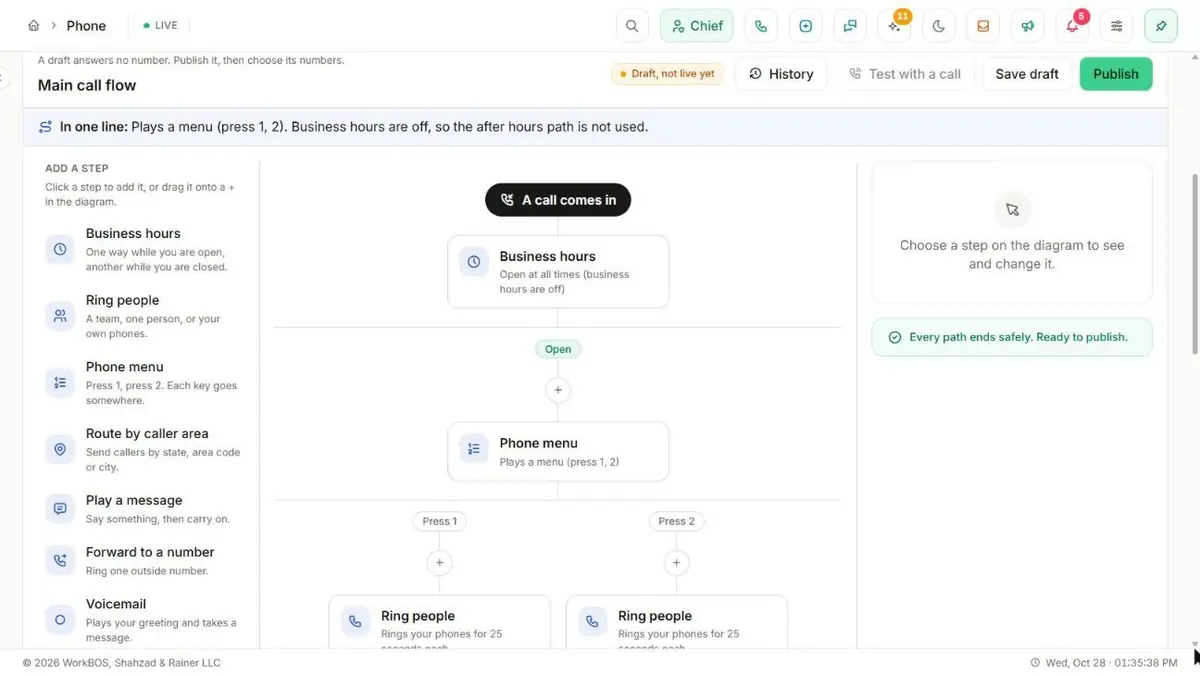
The Call flow builder draws your flow as a diagram from "A call comes in" to every place a call can end: business hours, ring people, a phone menu, route by caller area, play a message, forward and voicemail. Nothing saves until every path ends somewhere a message can be left.
09Leave the live board up
The Live board shows callers waiting and the longest wait, calls in progress with a running clock, who is on a call, free or away, and today’s answered and missed calls and average call length.
10Dial with your directory beside you
The Dialer tab puts the keypad next to everyone the workspace can call: leads, clients, CRM contacts and teammates with their extensions. The softphone reconnects by itself and can float over other pages or stay on its tab.
11Text a list on a schedule
Campaigns text a chosen slice of your leads once, in their local working hours, paced by a daily cap, with STOP replies removed mid-send. It runs from a number you own that is registered for marketing messages.
12Check the whole path when something is wrong
A system check tests numbers, browser reachability, whether incoming texts and calls are arriving, whether delivery reports come back, whether voicemail is capturing, and how long a recording takes to land. It says why in plain language, and separates a problem you must fix from one that fixes itself.
The honest part
What it does not do
The part you would otherwise find out in week three. If one of these is central to how you work, raise it before you buy rather than after.
Questions
Questions, answered
Which countries can I get a number in?
Thirty-eight. Some countries require an address or a document before a number can be issued, and the ordering flow collects that rather than failing quietly.
Do calls show up on the customer record?
Yes. Callers are matched to your CRM by phone number across clients, contacts and leads, so a call, its notes and its voicemail land on the record they belong to instead of in a separate app.
Can I send marketing texts?
Yes, from a number you own that is registered for marketing messages where you are, such as 10DLC in the US, connected through your own carrier account. Until it is registered you can write and save a campaign but not start it, because unregistered volume gets filtered by carriers.
What does it cost?
Number rental plus per-minute and per-message usage, itemised in the billing tab with the quantity, the rate and the amount, and readable for past months. Rental is charged for the whole month and is never split by the day in either direction, which is how the carrier bills us.
The full product documentation for this module is at /docs/phone.
Read next
Pro and up
SMS and texting
Pro and up
AI receptionist
Every plan
Team chat and calling
Try it on your own data
Every module is in the same workspace, so nothing needs connecting to anything.
Free for up to 5 users. Pro free for 30 days. No card.