Real double-entry books, in the same place as the work
A general ledger with a chart of accounts and journal entries, not a bookkeeping add-on bolted to a project tool. Several companies can keep separate books and still be read together.
Free for up to 5 users. Pro free for 30 days. No card.
See it work
Bank lines in, books up to date
Transactions from your bank wait for review, WorkBOS suggests the category, and the profit and loss updates.
The real product, filmed in a made-up demo workspace. No sound; captions on.
Why this exists
- The project tool and the accounting tool disagree, and reconciling them is somebody’s week.
- Group companies mean group spreadsheets.
- "Accounting" in most work platforms means a list of invoices.
What it does
What it does
01Keep a real general ledger
A chart of accounts, journal entries that balance, budgets and tax rates. Not a summary view over an invoice list.
02Let the work post itself
Invoicing, bills, expense claims and payroll feed the ledger. Marking a payroll run Processed or Paid creates a Salaries ledger entry through a database trigger, and it is idempotent: re-processing does not double-post.
03Run several companies without several logins
Each company keeps its own books underneath, and the Entities view consolidates across all of them. Consolidating is a view rather than a merge you cannot undo.
04Track what you owe and what you hold
Bills and purchases, vendor subscriptions, recurring expenses, bank accounts, assets and liabilities, credit notes and payment receipts, each as a real record rather than a note.
05Value your stock into the books
Inventory holds stock levels and adjustments carrying a reason and a unit cost, and the valuation posts into the general ledger rather than sitting in a spreadsheet beside it.
06Run every finance report in one place
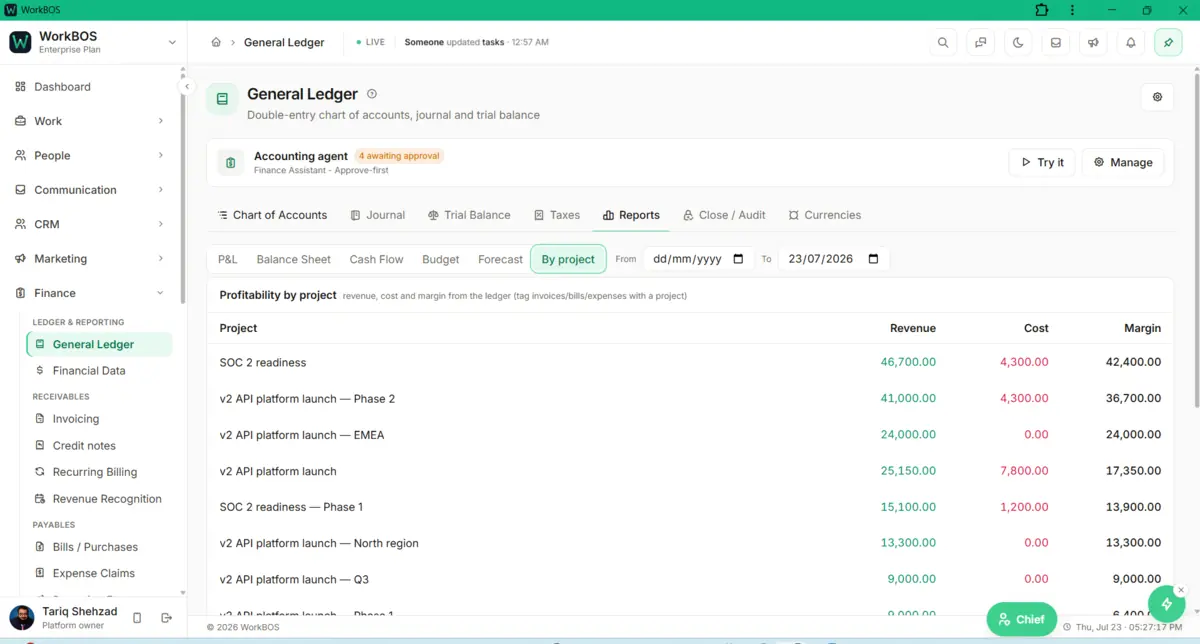
Finance reports holds Profit and loss (also by month), Balance sheet, Cash flow, Trial balance, expenses by category and by supplier, income by category, sales by customer and by product, and receivables and payables aging. Each one exports or prints, and a row opens the ledger behind it.
07Open any account’s ledger
In the General Ledger, click an account for its opening balance, every posted line with a running balance, and its closing balance. A supplier’s or customer’s ledger shows every line for them across every account. Manual entries hold the journal entries you post yourself.
08Read it as a report
A Finance Summary pack gives total raised, paid, outstanding and overdue with a breakdown by status, branded and printable for a client or a lender.
The honest part
What it does not do
The part you would otherwise find out in week three. If one of these is central to how you work, raise it before you buy rather than after.
Questions
Questions, answered
Is this real double-entry, or a report over invoices?
Real double-entry, with a chart of accounts and journal entries that balance. Invoices, bills, expense claims and payroll post into it rather than being summarised over it.
Can I run more than one company?
Yes. Each company keeps its own books and the Entities view consolidates across them. Multi-entity is included from Pro upwards.
Do you connect to my bank?
If you use Wise, Stripe, Square, Mercury or PayPal, yes: paste a read-only key once per account and every transaction arrives by itself every hour, fees split out, with WorkBOS suggesting where each one goes and learning from your answers. Any other bank comes in as the statement file your online banking downloads (CSV, OFX or QFX), unless live sign-in to US and Canadian banks has been switched on for your platform. We would rather say that here than let you find out during onboarding.
Can I replace QuickBooks or Xero with this?
For the ledger, the invoicing and the bills, plausibly. Not for statutory payroll, and only Wise, Stripe, Square, Mercury and PayPal connect directly everywhere today. The comparison pages set out row by row where we are ahead and where we are behind.
The full product documentation for this module is at /docs/tracking.
Read next
Every plan
Invoicing and payments
Pro and up
Bank accounts and reconciliation
Pro and up
Bills, suppliers and expenses
Pro and up
Revenue recognition
Try it on your own data
Every module is in the same workspace, so nothing needs connecting to anything.
Free for up to 5 users. Pro free for 30 days. No card.