The lead worth calling first, without anyone guessing
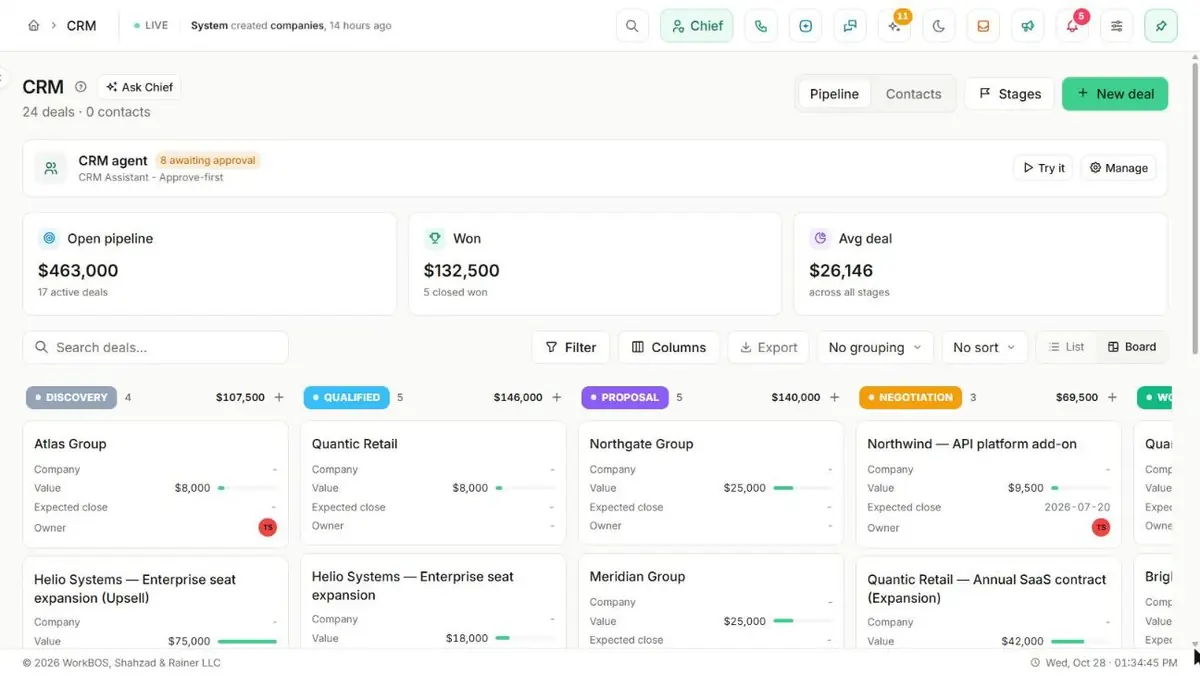
Deals move through pipeline stages you name yourself, each one linked to the company and contact it belongs to. Every lead gets an automatic 0-100 score the moment it arrives, so your team calls the hottest ones first instead of guessing.
Free for up to 5 users. Pro free for 30 days. No card.
Why this exists
- A lead sits in an inbox until somebody remembers to call it, and by then somebody else already did.
- A deal lives in a spreadsheet that only one person keeps current, and stops the day they leave.
- Nobody can say which of forty open leads is actually worth calling first.
What it does
What it does
01Track deals through stages you name
The pipeline starts as Lead, Qualified, Proposal, Negotiation, then Won or Lost, and Stages (owner or admin) lets you rename, add and reorder them. Renaming a stage carries its deals along, and each one carries a "Counts as" switch - Won, Lost or neither - so reports and the won-deal-becomes-a-client rule know what it meant.
02Score every lead the moment it arrives
A 0-100 score is computed automatically from contactability (email, phone), source and deal value, and shown as Hot, Warm or Cold. Sort the Leads list by score and call the hottest ones first instead of guessing.
03Keep one person as one lead
When the same email submits one of your forms twice, the second enquiry is added to the open lead instead of creating a duplicate. Who gets a new lead is a rule on the form itself: whoever created it, round robin, or one named person.
04Make leads from calls, texts, voicemails and social messages
On a phone or Social Inbox conversation, press Make lead. Owners and admins can also switch on Automatic leads on the Leads page, so a new conversation becomes a lead by itself. A call counts only for the time after a person answered, and robocalls, toll-free numbers and callers the carrier marks as spam never create a new lead, though a number that already has a lead still links to it. The carrier’s caller name is used when there is one.
05Log activity on every record
Notes, calls, emails and meetings sit on a live timeline against the deal, contact or company they belong to, so the history is one click away instead of scattered across inboxes.
06Turn a won deal into a project
Create a project directly from the pipeline view once a deal is won, already linked to the company it came from.
07Give every lead a result
Leads is where every enquiry lands. Move the good ones to the Sales Pipeline, or give the rest a result: Lost, Follow up later, Do not contact or Archive. Clients come from the deals you win.
08Keep proposals and contracts on the record
Proposals tracks client proposals with their values and statuses, and Contracts tracks signed agreements with values and expiry dates, beside the client they belong to.
09Draft the document from a template
Administration > Templates holds 25+ built-in templates across legal, sales, HR, finance and operations, such as an NDA, a statement of work, a proposal or a quote, with merge fields and your letterhead. Customize a copy, or write your own.
10See what you won, what you lost and why
Win / loss reads your pipeline over the last three months, twelve months or two years, counted in real calendar months.
11Write your own statuses and fields
Contact status starts as Lead, Active, Customer and a few more, and the gear beside the field lets an owner or admin rename, recolour, reorder or add to it. Custom fields on deals, contacts and companies are defined once and appear on every record of that type.
The honest part
What it does not do
The part you would otherwise find out in week three. If one of these is central to how you work, raise it before you buy rather than after.
Questions
Questions, answered
How is a lead score calculated?
Automatically, from whether you have an email and phone, where the lead came from (referral and form leads rank higher) and the deal value attached to it. It updates itself whenever those fields change; there is no manual override.
What happens when I mark a deal as won?
You can create its project straight from the pipeline view, already linked to the company. A stage’s "Counts as" setting decides whether closing it counts as won or lost, whatever you have actually named the stage.
Does CRM stop duplicate leads?
For the cases that cause most of them. The same email submitting a form twice adds to the existing open lead. Make lead and Automatic leads look for an open lead with the same phone number, email or social handle (same platform) and tell you which one matched. A lead or contact you add by hand is not checked against what is already there.
Can I change a contact’s status options?
Yes. The list starts as Lead, Active, Customer and a few more, and the gear beside the field lets an owner or admin rename, recolour, reorder or add to it. The board groups by whatever list you end up with.
The full product documentation for this module is at /docs/crm.
Read next
Every plan
Forms
Pro and up
E-signature
Every plan
Booking and appointments
Try it on your own data
Every module is in the same workspace, so nothing needs connecting to anything.
Free for up to 5 users. Pro free for 30 days. No card.