The plan, the dates and the next good idea, kept in one place
Start a project from a ready-made plan, see every project on one timeline, and let the team vote an idea into real work. Tasks repeat themselves, remind you, and keep their own time.
Free for up to 5 users. Pro free for 30 days. No card.
Why this exists
- Every new project starts from a blank page, so the same twenty tasks get typed in again and the one that matters gets forgotten.
- Nobody can see at a glance which projects are running late against the others.
- Good ideas live in a chat thread and die there, because there is no path from "we should" to a project with an owner.
What it does
What it does
01Start a project from a template
Work > Project Templates ships seven built-in plans: Website Launch, Client Onboarding, Product Launch, Marketing Campaign, Event Planning, Software Development Sprint and Quarterly Business Review. Pick a start date and every task is created with its due date set from that day.
02Make your own, or save one you just ran
Owners and admins build custom templates with a priority and a day offset on each task, or press Save as template on any project to reuse its task plan. Built-in templates are read-only and can never be deleted.
03See every project on one timeline
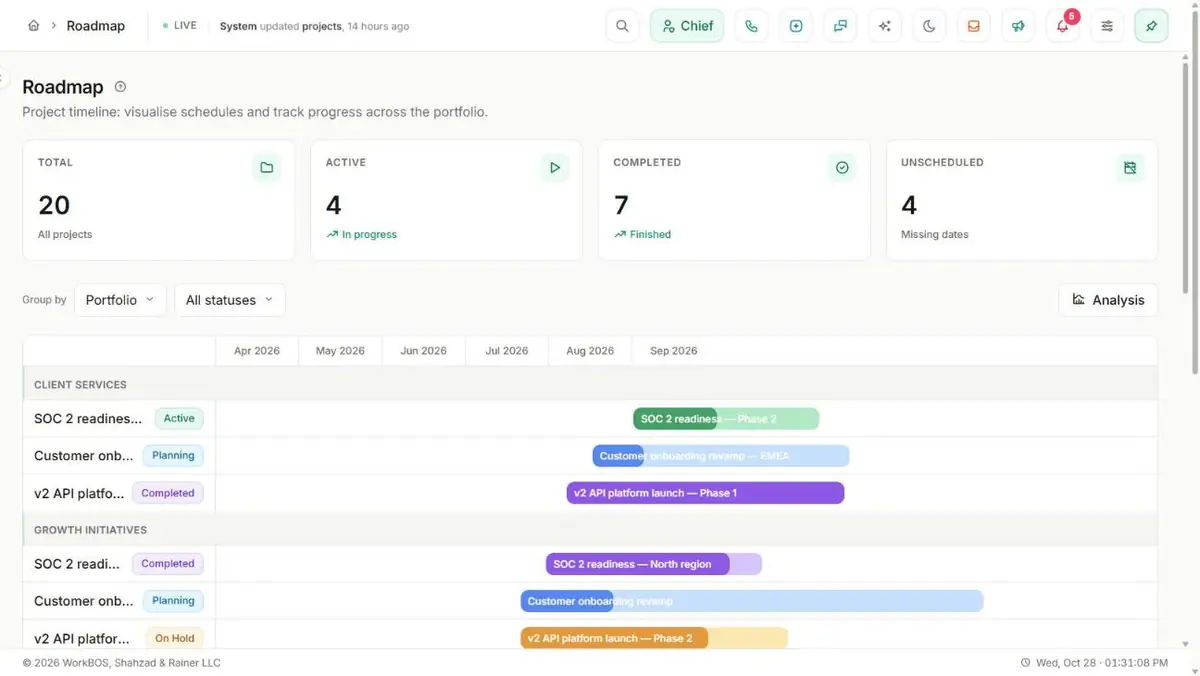
Work > Timeline is a Gantt view of your projects grouped by portfolio, with a progress overlay, a today line and an Unscheduled bucket for projects that have no dates yet.
04Let tasks look after themselves
Set a task to repeat daily, weekly, every two weeks or monthly, and completing it creates the next one. Add a personal reminder and it arrives as a notification. Start a timer, tick off a checklist, follow a task and mention a colleague in its comments.
05Vote an idea into a project
Work > Ideas is a pitch board with voting and as many stakeholder polls per idea as you need, each with its own deadline. Convert a winning idea and the new project starts with its title and pitch, and the two stay linked.
06Keep your own sticky notes
Notes holds your personal sticky notes in four colours, searchable from the top bar, so the small reminder does not have to become a task.
The honest part
What it does not do
The part you would otherwise find out in week three. If one of these is central to how you work, raise it before you buy rather than after.
Questions
Questions, answered
Can I reuse a project I already ran?
Yes. On the project page, owners and admins press Save as template, and each task keeps its due date as a number of days after the project start. The next project built from it gets fresh dates from its own start date.
Do recurring tasks need anybody to recreate them?
No. Completing a recurring task creates the next occurrence on the schedule you set: daily, weekly, every two weeks or monthly.
Is there a Gantt chart?
There is a timeline of projects, grouped by portfolio, with progress and a today line. It does not draw individual tasks or links between them.
The full product documentation for this module is at /docs/project-templates.
Read next
Every plan
Projects and tasks
Every plan
Teams and workload
Every plan
Calendar
Try it on your own data
Every module is in the same workspace, so nothing needs connecting to anything.
Free for up to 5 users. Pro free for 30 days. No card.